
Why Easypaisa & JazzCash Matter for LudoVegas Players
Easypaisa (Telenor Microfinance Bank) and JazzCash (Mobilink Microfinance Bank) are the two most widely used mobile wallets in Pakistan. Together they cover the vast majority of Pakistani smartphone users, which is exactly why LudoVegas integrates both directly inside the official APK.
If you are looking up "ludo vegas easypaisa", "ludo vegas jazzcash", "how to withdraw from teen patti vegas" or "easypaisa game pakistan" — this guide answers all of those questions in one place. It is written from the perspective of a Pakistan-based player and assumes nothing more than that you have an Easypaisa or JazzCash account in your own name.
Quick Facts: LudoVegas Payments
- Supported wallets: Easypaisa & JazzCash (both deposit and withdrawal).
- Currency: Pakistani Rupees (Rs / PKR).
- Deposit time: usually instant after wallet confirmation.
- Withdrawal name rule: the chip-out account name must match the registered name on your wallet.
- Where it lives in the app: Recharge / Bonus for deposits, Chip Out (or "Withdraw" button) for cashing out.
- Eligibility: 18+ only, where local law permits real-money games.
Before You Deposit — A 60-Second Checklist
To avoid the most common deposit and withdrawal failures, take 60 seconds to confirm the following before you start:
- Install the official APK from ludovegas.com. Do not use APKs forwarded in WhatsApp or Telegram groups — those can be modified copies.
- Register with your real Pakistani phone number, the same one linked to your Easypaisa or JazzCash account if possible. This makes withdrawals smoother because the names match.
- Top up your wallet first. Easypaisa or JazzCash needs to have enough balance to cover both the deposit amount and any wallet-side service fee.
- Decide a budget you can afford to lose. Real-money gaming should be entertainment, not a way to pay bills. Read the Responsible Gaming page first if you are new.
- Have your CNIC details ready in case the app or wallet asks for verification on a large transaction.
How to Deposit on LudoVegas with Easypaisa
The deposit flow inside the LudoVegas APK is consistent across both wallets — the steps below describe the Easypaisa path. JazzCash is shown right after this section.

Open the deposit page
Launch LudoVegas, then tap the Recharge or Bonus button on the lobby. The Shop screen above will open with all payment channels and bonus tiers visible.
Select Easypaisa
Choose Easypaisa from the payment methods list. Pick a deposit amount from the preset chips (50 / 100 / 300 / 500 / 1000 / 2000 / 5000…) or enter a custom value.
Enter your Easypaisa number
Confirm the Easypaisa-registered mobile number. For most users this is the same number you used to register on LudoVegas, but you can also use another Easypaisa account that belongs to you.
Approve in the Easypaisa app
The Easypaisa app (or USSD prompt) will ask you to confirm the transaction with your MPIN. Approve it. Never share your MPIN or OTP with anyone — even someone claiming to be from "support".
Chips arrive instantly
Within seconds, the deposit amount (plus any first-recharge or recharge-rebate bonus, if eligible) is credited to your LudoVegas balance. You can see it in your top-right balance indicator.
How to Deposit on LudoVegas with JazzCash
The JazzCash flow is structurally identical to Easypaisa — you simply pick the JazzCash option:
- Open the LudoVegas Recharge page.
- Tap JazzCash in the payment list.
- Choose your amount (Rs 50 minimum on most tiers).
- Enter your JazzCash-registered mobile number.
- Approve the request inside the JazzCash app or via the dialer USSD prompt with your MPIN.
- Chips are added to your LudoVegas wallet within seconds.
Easypaisa Quick Reference
- Issuer: Telenor Microfinance Bank.
- Confirmation: MPIN inside the Easypaisa app.
- Deposit time: typically instant.
- Wallet-side fees: see your Easypaisa schedule of charges.
- Both deposit & chip-out supported on LudoVegas.
JazzCash Quick Reference
- Issuer: Mobilink Microfinance Bank.
- Confirmation: MPIN via JazzCash app or USSD.
- Deposit time: typically instant.
- Wallet-side fees: see your JazzCash schedule of charges.
- Both deposit & chip-out supported on LudoVegas.
Important: who you are paying
When you deposit, the wallet payment is going to the LudoVegas merchant account. If the recipient name shown in the wallet does not look like an official LudoVegas merchant, or you were asked to send money to a personal number outside the app, stop the transaction. That is not how the official app works.
Reading the Shop Screen — Channels, Multipliers and Tiers
The Shop screen is denser than it looks. Three pieces of information sit side by side, and understanding each one stops you from picking the wrong tile by accident:
1. Payment Channels (top tabs)
You will usually see several tabs at the top: Jazzcash-1, Jazzcash-2, Easypaisa-1 and sometimes a "Jazzcash only" tab. These are different processing channels for the same wallet — the app routes to whichever one is most stable in your region. Pick the channel that matches the wallet you actually want to use; the bonus tile values can differ slightly between channels.
2. Multiplier Badges (10% 2X up to 35% 7X)
Each tier card shows two numbers: a percentage (10% / 15% / 20% / 25% / 30% / 35%) and a multiplier (2X / 3X / 4X / 5X / 6X / 7X). The percentage is the bonus chip credit added to your deposit; the multiplier is the wagering condition you must meet on those bonus chips before they convert to Withdrawable. Higher tiers give a bigger bonus but a longer playthrough.
3. Amount Tiles (Rs 1,000 to Rs 20,000)
The lower row shows fixed deposit tiles such as Rs 1,000 / Rs 2,000 / Rs 3,000 / Rs 5,000 / Rs 10,000 / Rs 20,000. The selected tile is highlighted in green and any extra +10% badge above the chip pile is the standard Recharge Rebate bonus on top of the multiplier tier.
Practical tip: start small. The Rs 1,000 tile (10% 2X) is the easiest to clear and is the typical starting point for new players. Move up tiers only after you understand the wagering rule shown on the tile.
How to Withdraw on LudoVegas — The Chip Out Flow
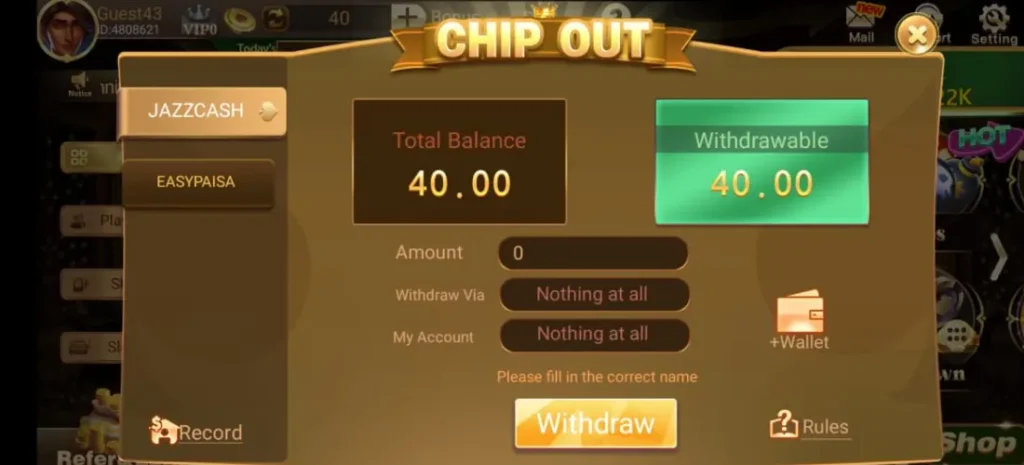
"Chip Out" is the in-app term for converting your withdrawable chips back to PKR in your Easypaisa or JazzCash account. The screenshot above shows the actual screen. Here is what each field means:
- Total Balance — all chips in your account (game balance + bonus chips that are still in playthrough).
- Withdrawable — only this amount can be cashed out. Bonus chips that haven't completed wagering rules are not included.
- Withdraw Via — choose the payout channel (JazzCash or Easypaisa).
- My Account — the wallet account name. This must match the name registered on your wallet, otherwise the request will be rejected.
- Amount — how much you want to chip out. Minimum and maximum are shown on screen.
Step-by-Step Withdrawal
Open Chip Out
From the lobby, tap Withdraw at the bottom of the screen, or open Chip Out from the menu. You will see a Total Balance and a Withdrawable amount.
Choose JazzCash or EasyPaisa
Tap the left-side tab to choose the wallet. Different wallets can have slightly different daily limits.
Set "+Wallet" with your account name and number
The first time you withdraw, tap +Wallet and enter your wallet number plus the exact account holder name registered on Easypaisa or JazzCash. Save it so you don't have to retype next time.
Enter the amount
Type the chip-out amount, within the allowed minimum and maximum. The screen also shows Total Balance and Withdrawable for reference.
Tap Withdraw
Submit the request. You can view its status under Record in the same Chip Out screen — it will go through Pending → Approved → Paid.
How long does the withdrawal take?
Most approved chip-outs land in your Easypaisa or JazzCash account within minutes. Your first-ever chip-out and unusually large amounts can take a little longer, because they are reviewed manually for fraud and AML (anti-money-laundering) checks. This is standard for all real-money apps in Pakistan, not a LudoVegas-specific delay.
Limits, Timing & Fees — What to Expect
The exact daily caps and minimums are shown on the in-app deposit and Chip Out screens (LudoVegas may adjust them seasonally). The general framework looks like this:
| Item | Easypaisa | JazzCash |
|---|---|---|
| Deposit speed | Instant after MPIN approval | Instant after MPIN approval |
| Withdrawal speed | Usually within minutes | Usually within minutes |
| Min deposit | Rs 50 (preset tier) | Rs 50 (preset tier) |
| Min withdrawal | Shown in Chip Out screen | Shown in Chip Out screen |
| App-side fee | None on standard chip-out | None on standard chip-out |
| Wallet-side fee | Per Easypaisa schedule | Per JazzCash schedule |
| Name match required | Yes | Yes |
| Withdrawable balance only | Yes | Yes |
Why You Might See Different Numbers Than a Friend
Three common reasons:
- VIP level — higher VIP tiers have higher daily withdrawal caps and faster review.
- Wallet limits — Easypaisa and JazzCash both apply their own monthly caps, depending on whether your wallet is a basic or full account (CNIC-verified).
- Promotional rules — some bonus chips have wagering / playthrough requirements, which means they only become "Withdrawable" after meeting the rule.
Common Errors & How to Fix Them
1. "Please fill in the correct name"
This is the most common chip-out error and is exactly the message visible in the Chip Out screen. It means the account holder name you entered does not match the name registered on your Easypaisa or JazzCash wallet.
Fix: Open your wallet app, copy the registered name as it appears (including spelling and any spaces), then paste it into the LudoVegas Chip Out screen and re-submit.
2. Deposit was deducted but chips did not arrive
If the wallet shows the money left your account but the LudoVegas balance did not update within ~5 minutes:
- Pull down to refresh the lobby balance.
- Check the in-app Record for the deposit status.
- Open Contact Us or 24/7 in-app live chat with the wallet transaction ID. Almost all of these resolve within an hour.
3. "Withdrawal pending" for several hours
If the request is in Pending and not Rejected, your account is in normal review. Reasons can include first-time chip-out, a larger-than-usual amount, or wagering not yet completed on a bonus. Wait until the review window closes; if it still hasn't moved after 24 hours, contact support with the chip-out ID.
4. "Insufficient withdrawable balance"
You have chips, but they are still bonus chips that have not completed playthrough. Continue normal play; the chips will convert to Withdrawable as the wagering condition is met.
5. Wallet says "Service not available right now"
This is on the wallet side, not LudoVegas. Easypaisa and JazzCash occasionally have short maintenance windows. Try again in 10–30 minutes, or use the other wallet temporarily.
Safety & Privacy Tips for Pakistan Players
- Only download from ludovegas.com. Modified APKs from third-party sites often skim wallet credentials.
- Never share your MPIN, OTP, or LudoVegas password. Real LudoVegas support will never ask for them.
- Use only your own wallet. Depositing from someone else's Easypaisa / JazzCash and withdrawing to your own is the most common cause of permanent withdrawal blocks.
- Keep screenshots of your last few transactions until they appear correctly in both apps.
- Log out if you share a phone with family members.
- Set a budget. If gameplay is interfering with daily life, see Responsible Gaming for tools and contacts.
Tax & Legal Note
Real-money gaming is regulated differently in different parts of Pakistan. Players are responsible for any applicable taxes on winnings. LudoVegas is for adults aged 18+, where local law permits. See the 18+ Disclaimer and Terms & Conditions before depositing.
Easypaisa vs JazzCash — Which Should You Use?
Both work equally well on LudoVegas. The choice usually comes down to:
- Which wallet you already have a verified, CNIC-linked account on. CNIC-verified wallets have higher monthly caps.
- Which wallet has more shops near you for cash-in / cash-out.
- Which wallet has lower fees for your typical transaction size — check each app's "schedule of charges".
- Backup strategy: many players keep both wallets installed. If one is in maintenance, they switch to the other for the day.
Ready to Try It?
Download the official LudoVegas APK, connect your Easypaisa or JazzCash wallet, claim available welcome bonuses and play responsibly. Start small, test a deposit and a chip-out before scaling up.
Frequently Asked Questions
Does LudoVegas charge a fee for Easypaisa or JazzCash deposits?
LudoVegas does not add a deposit fee on top of your transaction. Easypaisa and JazzCash apply their own service charges according to their published schedule. Always check the wallet confirmation screen for the exact total before approving.
Can I deposit from one wallet and withdraw to another?
It is generally allowed because both Easypaisa and JazzCash are valid chip-out destinations, but the withdrawal account name still has to match the registered name on the receiving wallet. Most players use the same wallet for deposit and withdrawal to keep things simple.
What is the minimum amount I can chip out?
The minimum chip-out is shown on the Chip Out screen and depends on the wallet and your VIP tier. Only the Withdrawable portion of your balance can be requested.
Why is only part of my balance "Withdrawable"?
Bonus chips usually require a small playthrough before they convert to Withdrawable. This is a standard rule across real-money apps and is meant to prevent bonus abuse. As you play normal rounds, the playthrough fills up.
Is my CNIC required?
Easypaisa and JazzCash already require CNIC verification to open a full mobile account. LudoVegas may ask for additional CNIC verification for larger withdrawals, especially if your wallet is in basic mode.
Can I use Easypaisa Smart Card / JazzCash Visa for LudoVegas?
The deposit flow goes through the wallet itself (mobile number + MPIN), not the physical card. If you have funds on a card, transfer them into your wallet first; then deposit normally.
What happens if I uninstall the app?
Your balance is tied to your registered phone number, not the app installation. Re-install the official APK from ludovegas.com, log in with the same number, and your wallet, balance and chip-out records all come back.
Is LudoVegas the same app as Teen Patti Vegas / 3 Patti Vegas?
Yes — the three names refer to the same official app. The deposit and withdrawal flows above apply to all three landing pages: Teen Patti Vegas, 3 Patti Vegas, and the main LudoVegas app.